guide / analysis

How to track a padel workout on Apple Watch

Choose a workout recording method for padel, understand Tennis and Other labels, and keep your exercise record separate from the match score.

Quick answer

You can record padel exercise on Apple Watch with the Workout app or a padel app that records Apple Health workouts. Apple's published workout list includes Tennis and Other, but does not list Padel. Workout recording captures the exercise session; recording points, games and sets requires a separate scorekeeping function. Choose one app to handle your workout and check its saved result after the match.

Score on your Watch. Review on your iPhone.
Download Padel Pointer for iPhone and Apple Watch.

Download Padel Pointer

Decide whether you want exercise tracking, scorekeeping or both

A workout record and a match record answer different questions. The workout tells you about the recorded exercise session. The match record tells you the score and, if you logged each point, the sequence of play. A Tennis workout on its own does not know which pair won a rally.

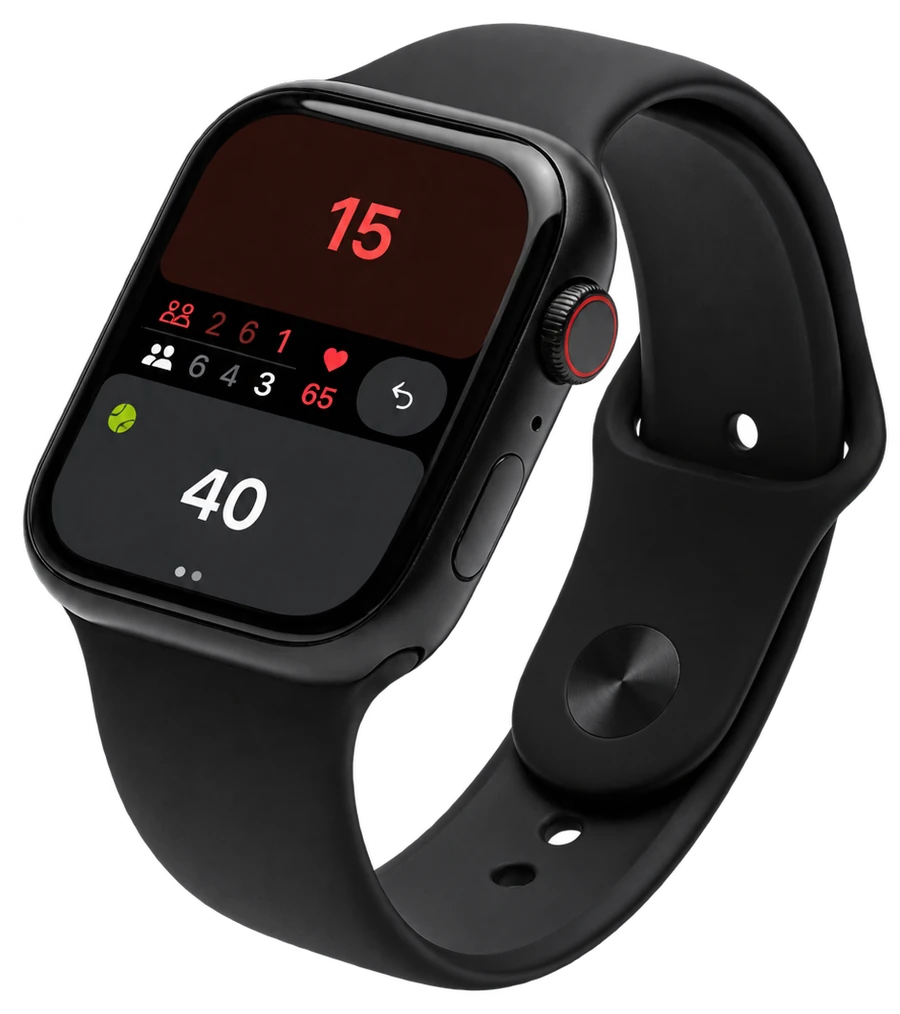
If you only want an exercise record, Apple's Workout app is one route. If you want wrist-based scoring too, choose a padel scoring app and check whether it also records an Apple Health workout. Padel Pointer's current App Store listing describes both Watch scorekeeping and Apple Health workout tracking.

  • Exercise only: use the workout recording route you prefer.
  • Score only: record the points and match format in a scorekeeper.
  • Both: check which app is responsible for saving the workout before you begin.
Record the session in Apple's Workout app

Open Workout on Apple Watch and find the activity you want. Apple's current support list includes Tennis; it also says you can choose Other when a matching workout type is unavailable. Padel is not separately named on that list. Scroll to the add button if you need to see the available workouts, then start your chosen activity when you are ready.

Keep the start and finish deliberate. If you start while still waiting for the other players, that waiting time can become part of the recorded session. Pause or finish using Workout's controls when appropriate, and review the saved workout afterwards in Fitness on iPhone. This route records exercise rather than the padel score.

  • Open Workout and find Tennis or another appropriate available option.
  • Use Other if you cannot find a matching activity, as Apple documents.
  • Finish the recording and check the date and elapsed time afterwards.

Use Padel Pointer when you also want the score

Padel Pointer lets you score the match on Apple Watch while recording workout information through Apple Health. Complete the app's setup and respond to the relevant Health permission prompts before your first match. Start the match in Padel Pointer and follow its workout flow, rather than separately starting a second recording in Workout.

The Watch app currently saves its workout using the Tennis activity type. Seeing Tennis in Fitness can therefore be consistent with a padel match you recorded through Padel Pointer. The sport label and your padel score history serve different purposes; the label does not change which points you recorded.

  • Check the scoring setup and first server before play.
  • Tap each point for the correct pair and use undo if you make a mistake.
  • End the match, wait for the saved summary and check that it reaches iPhone.

Check the saved workout and the saved match separately

After your first test, find the workout in Fitness on iPhone and the match in Padel Pointer. Check the date, start time and duration so you can recognise the session. Then confirm the match score with your partner. A workout can exist without a point-by-point score record, and a score record does not by itself prove that every workout metric was saved.

For example, your court booking may include time getting ready, the exercise recording may include warm-up, and the match record may begin at the first point. Those are different clocks. Compare their start and finish times before deciding that a difference is an error. Treat calorie values as estimates, not a score of how well you played.

  • Check one expected workout rather than assume multiple entries represent separate matches.
  • Confirm the final score independently of heart-rate or calorie readings.
  • Keep unavailable workout data labelled unavailable; it is not the same as a zero reading.

If workout data is missing, check access before the next match

If Padel Pointer recorded the score but workout information is missing, check the app's Apple Health access and read the Health permissions support guide. Permission names and settings locations can vary with your iPhone and Watch software. Follow the current prompts for the data you want to record; do not assume a blank chart measures what happened on court.

Try a short recording before your next full session, then confirm that it saved. If the problem continues, contact support with the device models, software versions and the point where the workflow stopped. Never include private Health exports just to explain a setup problem.

  • Check that the apps are installed and ready on the paired devices.
  • Review the relevant Health access and try a short test session.
  • Use the linked support guide for current settings instructions.

Frequently asked questions

Does Apple Watch have a Padel workout option?

Apple's published list checked on 10 October 2026 includes Tennis and Other but not Padel. Check the options on your Watch too, since software and available activities can change.

Why does my Padel Pointer workout appear as Tennis?

The Watch app uses the Tennis workout activity type for padel sessions. Your padel score remains in Padel Pointer; the workout category is the label used for the exercise record.

Does a Tennis workout automatically count the padel score?

No. A workout record does not identify rally winners or build a games-and-sets score. Use a scorekeeper and record the points if you want that match history.

Should I start Workout as well as Padel Pointer?

Choose one app to handle workout recording. If you use Padel Pointer's workout flow, start the match there and check its saved workout instead of starting another recording for the same session.

Sources and evidence

  • Apple Support — workout types

    Published 28 May 2025 · Checked 10 October 2026

    Apple lists Tennis and Other and explains using Other when a matching workout is unavailable; Padel is not named in the checked list.

  • Apple Watch User Guide — start a workout

    Checked 10 October 2026

    Apple documents choosing, adding, starting, pausing and resuming workouts.

  • Padel Pointer — Health access support

    Published 21 February 2026 · Checked 10 October 2026

    First-party guidance covers permissions and missing workout information. The Tennis label was also checked against the Watch app's workout configuration.

  • Padel Pointer on the App Store

    Checked 10 October 2026

    The live version 1.4.6 listing describes Watch scoring, Apple Health workouts and iPhone match history; it does not establish individual measurement accuracy.

Read next

Turn the insight into a better next match.

Track every point on Apple Watch, then understand momentum, patterns, and improvement areas on iPhone.

Padel Pointer scorekeeping on a black Apple Watch